
 Syspirit

One day, there’s a network outage at one of our sites. The ERPs stop responding. The infrastructure team is already on it, working out where the failure comes from and how to bring things back. Except nobody has said a word. So the dev and project teams end up receiving tickets and messages about the outage, without knowing anything about what’s going on.
I’ve seen this kind of scene in plenty of forms at the companies I’ve worked for:
- An internal app gets a new release, with no changelog. Users don’t know it has been updated, what moved or what was fixed.
- A service is going to be down for two hours for maintenance. If nobody announces it, everyone finds out in the middle of their work.
- Microsoft 365 goes down. Outlook and Teams stop responding, IT can’t do anything about it, but until they say so, everyone still turns to them.
Every time, someone knew. The information just never reached the people concerned.
That’s what I built Statup to fix: a self-hosted status page where each team writes once what’s down, what’s planned and what has changed, and where everyone can read it in plain words. The first public version has just been released, so let me introduce it.
What is Statup?
A web page that everyone in the company can open, from a desktop or a phone, to see whether a tool is working, what’s going on and what’s planned. It all rests on three building blocks:
- Services: the tools people use every day, such as email, the VPN, the ERP or the phones. Each one shows one of four states: operational, degraded, outage or maintenance.
- Events: what gets published on the page. An incident when something breaks, a maintenance when work is planned, an announcement for everything else: an update, a new tool, a printer moving to another floor. An incident puts the services concerned into degraded or outage depending on its impact, a maintenance puts them into maintenance, and everything goes back to operational once it’s over.
- People: readers view the page, with or without an account depending on what the administrators choose. Editors publish events, whether that’s IT or, for example, the manager of a business application announcing an outage on her own tool. Administrators also handle the settings, the team and the page layout.
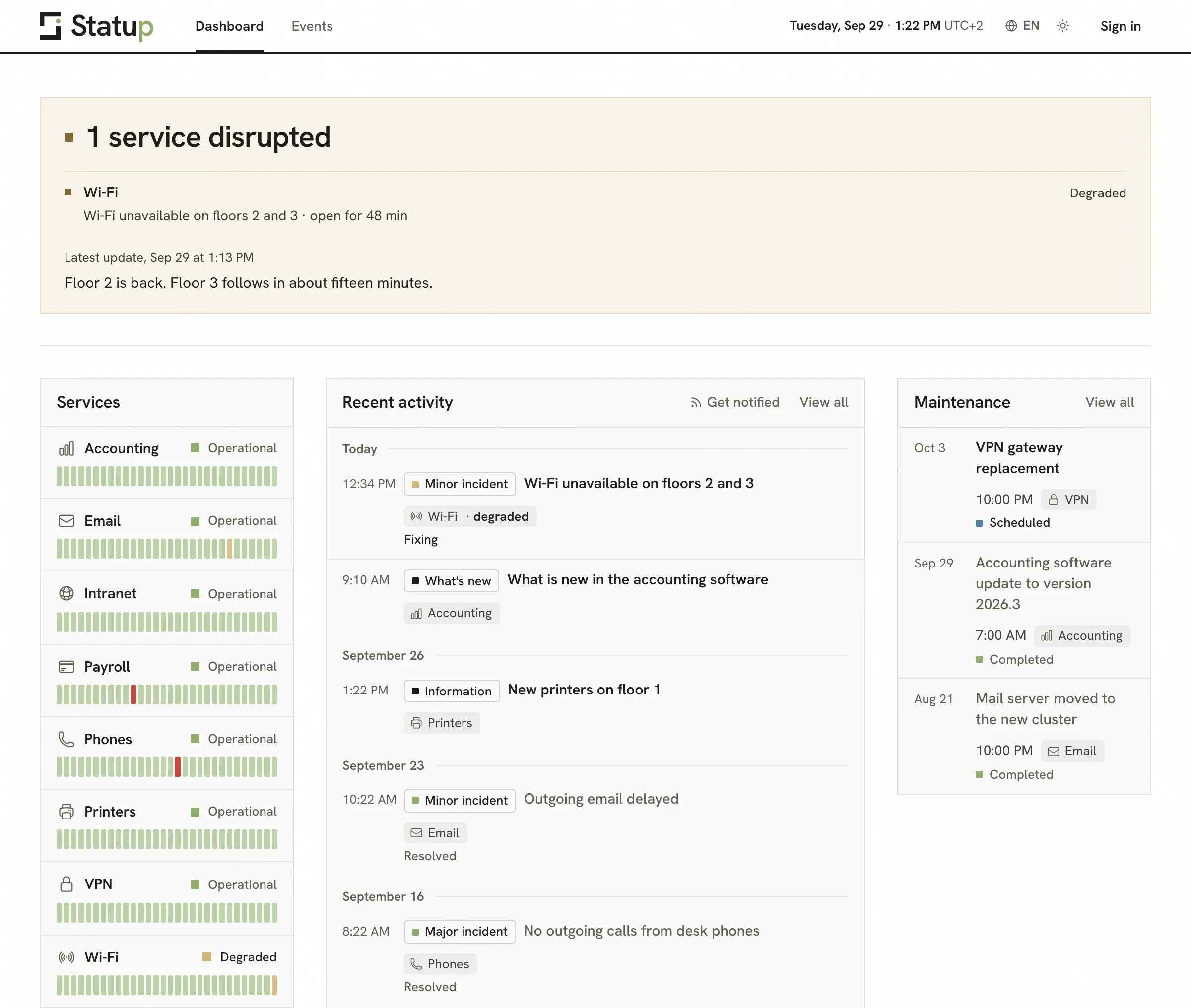 The dashboard, on demo data.
The banner at the top answers the question everyone is asking straight away: one service is disrupted, the Wi-Fi on floors 2 and 3, for 48 minutes, with the latest published update. Below it, each service with its last 30 days, the recent activity and the upcoming maintenance.
What it does
A page that answers first: the banner says whether something is wrong, what’s affected and since when, before anything else. The page refreshes itself every minute.
Incidents, start to finish: from investigation to resolution, with dated updates and reusable templates for the outages that keep coming back. Microsoft 365 goes down? An incident on Outlook and Teams, and one line saying the outage is on Microsoft’s side and there’s nothing to do on ours.
Maintenance that runs itself: announced in advance, a maintenance starts and ends at the planned times, with nobody at the keyboard. It can also say that the services stay usable during the work.
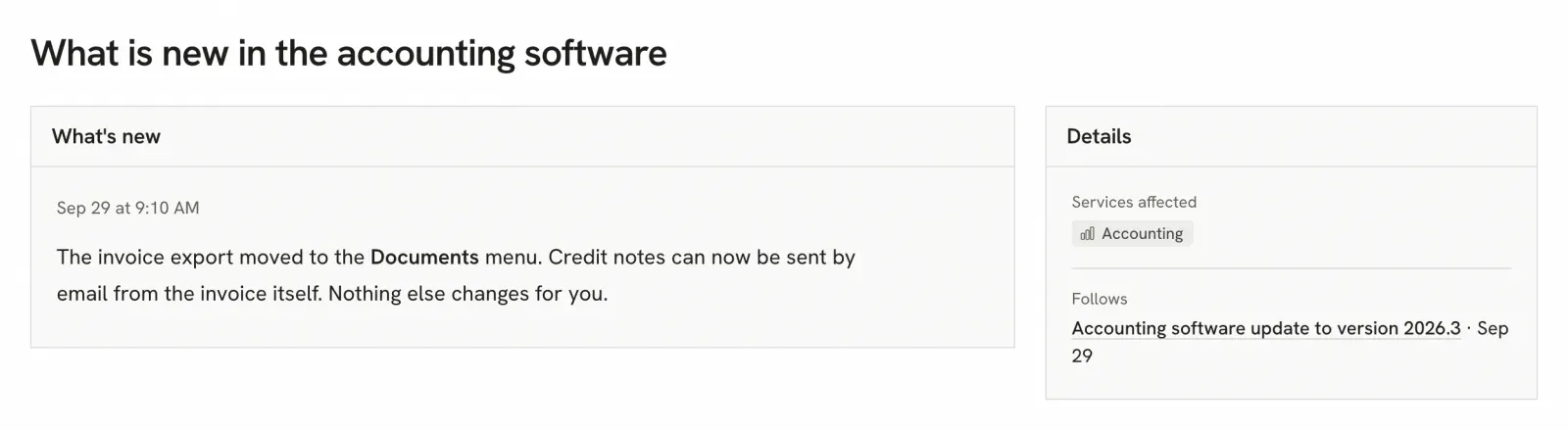
What’s new: this is the changelog the internal app from the intro was missing. An announcement reads like a short article: what changed, what was fixed, where a given feature now lives. And at the end of a maintenance, a button drafts the announcement of what’s new, linked to the maintenance it comes from.
History: every event in one list, with search and filters by type, service or date. Handy for finding out when someone last touched the mail server.
Stay informed without opening the page: an Atom feed, to follow in a feed reader or in your mail client, with a page explaining how to subscribe for people who have never heard of RSS.
A page that looks like you: open to everyone or restricted to members, with the company’s name and logo. Blocks can be moved, resized or hidden right on the page. All in English or French, light or dark.
Installing it
I chose Rust because I wanted something lightweight and modern. Statup fits in a single binary with an embedded SQLite database, and the Docker image is under 10 MB to download. It runs on any Linux server, x86-64 or ARM.
With Docker, three commands are enough:
mkdir statup && cd statup
curl -O https://raw.githubusercontent.com/karl-cta/statup/main/docker-compose.yml
docker compose up -d
The app then answers on port 3000 of the server. On first launch, it walks you through four steps: the administrator account, the page’s name and logo, the services to follow, then the address to share.
To get HTTPS and an address like status.yourdomain.com, just put it behind a reverse proxy. I cover that in my article on Nginx Proxy Manager, and the self-hosting guide has the configurations for nginx and Caddy, backups and the rest of the settings.
What it doesn’t do yet
Let’s be clear about the biggest limitation: right now, Statup only knows what it’s told. It doesn’t check by itself that your services respond. If nobody feeds it, you’re right back to the original problem.
That’s what I want to work on next: having Statup detect some outages on its own, with simple checks (a ping, an HTTP request to the service), and an API so other tools can publish by themselves, a monitoring tool like Zabbix or Grafana for example.
On the alerting side, no Teams, Slack or email notifications yet: you follow Statup on the page or through its Atom feed. It’s on the roadmap, along with user groups that only see their own services, and recurring maintenance.
Conclusion
Statup was born from a communication problem I kept running into. I designed it for internal use, but I’d like it to go further: a public page works just as well for letting customers know about an outage or a maintenance. Even OVH, during the Januscape crisis, had to build a banner in the middle of the operation to warn its customers.
Statup has never run in production yet, so I’d be really happy to have people test it, for personal use or at work. And if you have ideas, I’ll take them all: that’s what the GitHub issues are for.
Useful links: