

Two years ago, Infrastructure as Code was a complete unknown to me. Someone introduced me to the subject during a job, and it clicked straight away. My mission: automate the deployment of our virtual servers across several vCenters.
The tool we picked was Terraform. And that is where the first doubt showed up. Everything I read about it talked about public cloud: AWS, Azure, GCP. Our machines, on the other hand, lived on on-premise VMware, spread over several vCenters, with Windows and Linux VMs to churn out on a regular basis.
Is Infrastructure as Code only for people who have public cloud?
No. And that is what I want to tell you about.
The vSphere provider does exist
Terraform never talks to an infrastructure directly. It goes through a provider, a piece that turns its instructions into API calls for a given platform. There is one for AWS, one for Azure, one for GCP, one for Docker, and yes, one for vSphere.
This one handles everything you ask of it day to day: clone a template, size the VM, plug it into the right port group (the virtual network, on the VMware side), drop it on the right datastore (the storage), file it in the right inventory folder, stick its tags on it and customise it on first boot.
terraform {
  required_providers {
    vsphere = {
      source  = "vmware/vsphere"
      version = "2.16.1"
    }
  }
}
The connection to the vCenter goes in a separate file:
provider "vsphere" {
  user                 = var.vsphere_user
  password             = var.vsphere_password
  vsphere_server       = var.vsphere_server
  allow_unverified_ssl = true
}
The allow_unverified_ssl deserves a word. Our vCenters served self-signed certificates that were never added to the trust store of the deployment machine, so there was not much choice. Ideally you ship the internal CA there and leave that flag on false.
And above all: credentials must never end up in a file. Where I worked the constraint was twofold. The vCenter accounts were personal ones, because we had to be able to trace who deployed what, and hardcoding them anywhere was out of the question.
Terraform reads any environment variable prefixed with TF_VAR_, which solves part of the problem: the credentials stay in the shell and never touch the disk.
export TF_VAR_vsphere_user='[email protected]'
export TF_VAR_vsphere_password='...'
We will see later how the form collects them at launch. But let’s be clear about the real answer: it is a vault. A Vault would have been more than welcome here, and it is the first thing this project was missing.
How a project is laid out, and what made it click
Building my first project is what made the logic of the tool sink in. Terraform is not one big file, it is a handful of files, each with its own job.
project/
├── vsphere_prov.tf     → which version of the provider
├── base.tf             → who I am talking to (the vCenter)
├── main.tf             → what I want (the VMs)
├── variables.tf        → the parameters that exist
└── terraform.tfvars    → the values for this specific deployment
The split between variables.tf and terraform.tfvars is what made it click for me. The first one declares what can be tuned, the second one fills those parameters for a given deployment. The main.tf never moves: it is the machinery. The tfvars is today’s order. Once you get that, you stop writing Terraform on every deployment and you just feed it.
Variable precedence
One detail that costs everyone time at least once: variable precedence. The same variable can be set in several places, and Terraform applies a strict hierarchy.
| Precedence | Source |
|---|---|
| 🥇 Highest | The command line: -var and -var-file |
| 2 | The *.auto.tfvars files, in alphabetical order |
| 3 | The terraform.tfvars.json file |
| 4 | The terraform.tfvars file |
| 5 | The TF_VAR_... environment variables |
| 🥉 Lowest | The default value in the variable block |
The trap is that intuition often runs the other way: you assume what you export in your shell wins, when it is almost the last link in the chain. When a value refuses to change even though you are editing the right file, something one level up is overriding it.
What it actually looks like
The main.tf starts by resolving what already exists in the vCenter. Those are the data blocks: they create nothing, they turn a name into an internal ID.
data "vsphere_datacenter" "datacenter" {
  name = var.vsphere_dc_name
}

data "vsphere_datastore" "datastore" {
  name          = var.vsphere_datastore
  datacenter_id = data.vsphere_datacenter.datacenter.id
}
Same idea for the cluster (vsphere_compute_cluster), the network (vsphere_network) and the template (vsphere_virtual_machine).
Then comes the resource. And here, one choice changes everything: instead of a count that spits out N identical machines, I went with a for_each over a map of objects. Each VM becomes a named entry with its own specs.
vm_config = {
  "SRVAPP01" = {
    cpu = 4, ram = 8192, ip = "10.0.10.21"
    system_domainname = "example.local"
    annotation        = "Application back end"
    disks_size        = [10, 5]
  },
  "SRVAPP02" = {
    cpu = 2, ram = 4096, ip = "10.0.10.22"
    system_domainname = "example.local"
    annotation        = "Application front end"
    disks_size        = [20]
  }
}
One apply produces both machines, each with its own size, IP and disks. That is the difference between “give me 3 VMs” and “give me this infrastructure”.
The resource then picks from each.key (the name) and each.value (the specs):
resource "vsphere_virtual_machine" "vm" {
  for_each = var.vm_config

  name             = each.key
  resource_pool_id = data.vsphere_compute_cluster.cluster.resource_pool_id
  datastore_id     = data.vsphere_datastore.datastore.id
  guest_id         = data.vsphere_virtual_machine.template.guest_id
  annotation       = each.value.annotation

  num_cpus               = each.value.cpu
  memory                 = each.value.ram
  cpu_hot_add_enabled    = true
  memory_hot_add_enabled = true

  network_interface {
    network_id = data.vsphere_network.network.id
  }

  # The system disk, taken from the template
  disk {
    label            = "disk0"
    unit_number      = 0
    size             = data.vsphere_virtual_machine.template.disks[0].size
    thin_provisioned = data.vsphere_virtual_machine.template.disks[0].thin_provisioned
  }

  # Then as many disks as requested
  dynamic "disk" {
    for_each = { for idx, size in each.value.disks_size : idx => size }

    content {
      label            = "disk${disk.key + 1}"
      unit_number      = disk.key + 1
      size             = disk.value
      thin_provisioned = true
    }
  }
}
The two hot_add_enabled are a small comfort that pays off nicely: they allow CPU and RAM to be added on the fly, without stopping the machine the day it turns out to be undersized. And the dynamic block generates as many disks as the disks_size list holds: [10, 5] gives two extra disks of 10 and 5 GB, numbered properly.
Hostname, IP and domain inside the VM
First boot customisation goes through the customize block, inside the clone. It pushes the hostname, the domain and the network config into the VM as it starts up:
  clone {
    template_uuid = data.vsphere_virtual_machine.template.id

    customize {
      linux_options {
        host_name = each.key
        domain    = each.value.system_domainname
      }

      network_interface {
        ipv4_address = each.value.ip
        ipv4_netmask = var.netmask
      }

      ipv4_gateway    = var.gw
      dns_server_list = var.dns_server
    }
  }
For Windows, you swap linux_options for windows_options with a computer_name.
vSphere tags
One last thing I was not expecting, and which turned out to be very handy: the provider knows how to apply vSphere tags at creation time, by resolving the category first (vsphere_tag_category) then the tag (vsphere_tag). In our case they were used for backup, among other things. These are exactly the tags everyone forgets to set by hand, and then goes looking for six months later, wondering why the machine is not being backed up.
The real problem is not Terraform
Technically, at this point, everything works. Except there is a catch, and it is the one that ate most of my time.
To deploy, Terraform wants the exact name of the datastore. The exact name of the port group. The exact path of the inventory folder. Character for character. And nobody knows those names by heart: they change from one vCenter to the next, from one site to the next. One typo and the apply falls over, after making you wait.
Multiply that by several vCenters, several sites, several VLANs with different network settings, and you end up with a tool that even I did not feel like running without keeping the web client open on the side to copy the names across.
An automation tool nobody dares to run automates nothing.
Ask the vCenter before asking the human
The idea of the form is not mine. A colleague I was working with on the subject suggested it: a bash script that asks the questions and fills the terraform.tfvars for us, relying on a hardcoded set of information to avoid typing mistakes.
It does make things safer, but it does not hold up over time. A list of datastores or port groups written into a script goes stale the first time the infrastructure changes, and nobody thinks to update it. Hence the principle I added on top, which became the heart of the whole thing: stop asking the user for what the vCenter already knows.
Credentials, typed at launch
The first thing the form does, once the target vCenter is known: ask for the credentials, and export them for Terraform.
echo -n "Username for $chosen_vcenter_name: "
read -r VCENTER_USER
echo -n "Password for $chosen_vcenter_name: "
read -rs VCENTER_PASSWORD

export TF_VAR_vsphere_user="$VCENTER_USER"
export TF_VAR_vsphere_password="$VCENTER_PASSWORD"
That answers the traceability constraint mentioned above: everyone deploys with their own account, typed at launch. The -s on read keeps the password off the screen, and the two export lines are enough for Terraform to find them when the time comes, without them ever touching the disk.
Those same credentials are then used to query the vCenter. And that is where my script falls short, something I only realised while writing this article: it passes them as arguments to the Python script that follows.
python3 script_import.py "$vcenter_host" "$VCENTER_USER" "$VCENTER_PASSWORD"Process arguments are readable by other users on the machine: a plain ps while it runs, and the password shows up. The window is short and you already need access to the deployment machine, but the fix costs nothing. Just pass them through standard input, or let the Python script read the TF_VAR_ variables that were exported a moment earlier.
This is exactly the kind of detail a Vault saves you from having to think about.
The inventory, read live
Before offering a single technical choice, that Python script connects to the vCenter and pulls the real inventory, through pyVmomi for most of it and the REST API for the tags, which are not exposed the same way.
from pyVmomi import vim
from pyVim.connect import SmartConnect, Disconnect
import requests
import ssl
import json
import sys
from requests.auth import HTTPBasicAuth

...

si = SmartConnect(host=vcenter_host, user=user, pwd=password, sslContext=context)
content = si.RetrieveContent()

def list_names(obj_type):
    view = content.viewManager.CreateContainerView(content.rootFolder, [obj_type], True)
    return [o.name for o in view.view]

info = {
    "vcenter_compute_clusters": list_names(vim.ClusterComputeResource),
    "vlan_info":                list_names(vim.Network),
    "datastore_info":           list_names(vim.Datastore),
}
Extract from the pyVmomi script
The script outputs a JSON with the datacenters, the clusters, the port groups, the datastores, the available templates, the folder tree and the tags sorted by category.
Picking from a list
A bash script then acts as the form. It reads that JSON with jq and only offers what actually exists:
echo "$vcenter_data" | jq -r '.vlan_info[]' | sort | nl -v 1
read -p "Enter the number of the VLAN you want: " vlan_choice
selected_vlan=$(echo "$vcenter_data" | jq -r '.vlan_info[]' | sort | sed -n "${vlan_choice}p")
The user no longer types a name, they pick a number from a list. Typos become structurally impossible.
The rest of the form moves on to what cannot be guessed (how many VMs, which specs, which IP) and generates the terraform.tfvars. Two bits of automation grew on top of it over time:
- The VM name is computed, not typed. The script suggests a name that follows the in-house naming scheme, which the user can still correct (
read -e -ipre-fills the input, perfect for that). - The netmask and gateway are derived from the chosen VLAN, through a lookup table. One less thing to go and find, one less mistake.
The whole thing is wrapped in a top-level script that creates the deployment folder, copies the Terraform files into it, runs terraform init then the form. The user types one command, answers about ten questions, reads their plan, and applies.
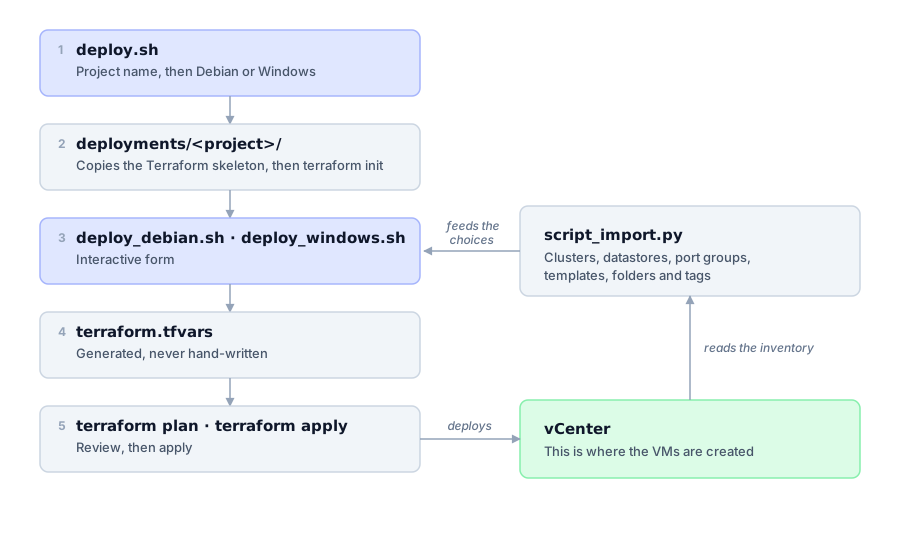
The full chain, from the command to the vCenter.
That is the point where it became a tool, rather than a Terraform project.
Let’s be clear about what it was: a v1. Some bash, a bit of Python, no shared state, and the flaws I go through further down. But it ran, it produced consistent machines, and it was my first step into IaC. You rarely start with a perfect platform, you start with the thing that solves the problem in front of you.
Post-deployment
The extra disks Terraform creates arrive raw inside the VM: not partitioned, not formatted, not mounted.
To deal with that: provisioners. A file one to push a script onto the freshly deployed machine, a remote-exec one to run it. The script scans the SCSI bus, skips disks that already have partitions, and for every blank disk creates a volume group, a logical volume (LVM does that job very well), an XFS filesystem, the mount point and the /etc/fstab entry.
Along the way, that remote-exec fixes a cloning trap: every VM built from the same template inherits the same SSH host keys. So the whole fleet shows the same fingerprint, which makes fingerprint checking pointless. Three commands are enough:
sudo rm -v /etc/ssh/ssh_host_*
sudo dpkg-reconfigure -f noninteractive openssh-server
sudo systemctl restart sshd
It works fine. And yet, this is the part I would do differently. Provisioners are a known anti-pattern, and HashiCorp says so itself: “provisioners are a last resort”. They are not idempotent, they depend on SSH, timing and the network, and Terraform has no idea what the script did. If it breaks halfway through, the VM sits in a state the state knows nothing about, that file where Terraform records everything it created so it can compare on the next run.
The right answer is to take configuration out of Terraform. Terraform builds the infrastructure, Ansible configures it. That separation is the one that holds up over time, and on Linux it is straightforward. On Windows you have to go through PowerShell and WinRM, run during or after the deployment. I never dug into that path, but it is clearly the way to go rather than stacking provisioners.
Let’s talk about Windows
The provider handles Windows, there is no debate about that. Cloning, the computer_name, the network config, all of it goes through windows_options without trouble.
But as soon as you step outside that scope, it gets tedious. I had started coding the automatic join to the Active Directory domain: pick the domain, enter the account, set the OU path. I ended up dropping it. Too heavy, too many special cases.
It is doable, sure. But you should not push your luck. On Linux, everything that follows the deployment flows naturally. On Windows, every extra step costs three times as much.
Looking back
The project ran and it was useful, but I am not going to sell it as a model. What I would do differently:
- The script ended up close to 600 lines. The interface, the naming logic and the configuration data all lived in the same file. The VLAN, gateway and prefix tables should have sat in a JSON next to it. Adding one VLAN meant editing bash and hoping nothing broke.
- One timestamped folder per deployment. Handy at the time, unmanageable afterwards: six months later, working out which folder matches which machine or project so you can run a clean
destroyis archaeology. - The provisioners, already covered. Ansible would have done the job properly.
One thing I do not regret, though: freezing the template choice. At first the form listed every template found on the vCenter. In practice there was only one up to date per OS, and leaving the choice open meant offering the chance to deploy onto a stale template. One less question, one less mistake.
This was only a starting point
Because let’s be honest about what it represents: deploying VMs cleanly is the first step.
- Git to version everything. The Terraform code, the script, the playbooks, and above all the configuration of every deployment. As long as the
tfvarsis regenerated and thrown away each run, there is no trace of who deployed what, when, with which parameters. - Ansible behind it, for everything that follows the creation of the machine, instead of provisioners.
- A Vault for the secrets. The deployment SSH key and the vCenter credentials have no business sitting in a file or in a shell
export. That is the most urgent item on the list. - CI to run the
planthen theapplyfrom a pipeline, with a human check in between, rather than from somebody’s shell. - An internal artifact repository to serve binaries and providers without depending on outbound internet access.
None of that was ever built, the project stopped before. But it is the right path, and if I picked it up again today I would start with the Vault and the versioning.
The web interface that never happened
And right at the top of that pile, I had one more idea: a web interface pulling it all together. A single entry point to create a whole project, with checkboxes instead of a terminal. You pick what you want, and the chain runs on its own:
- Terraform creates the machines
- Ansible configures them and installs whatever was ticked
- The machines are registered in the monitoring tool
- The inventory and the service management tool are updated right after
- The Terraform
stategoes to a remote backend, instead of living on the laptop of whoever ran the command
The point is not technical, it is human: making deployment accessible to someone who knows neither Git, nor Terraform, nor Ansible, nor Linux. CI would handle a good chunk of the orchestration, true, but it does not answer that question, since you still need to know how to write a file and push a commit. The interface is what turns a tool for a technical team into a service anyone can use.
I had started building it, and honestly it was beginning to look like something. It never got finished. Partly for lack of time, but mostly because Terraform itself was of no interest to management: building an interface on top of a tool nobody else was using did not make much sense any more. That said, with what vibe coding allows today, it would be well within reach, and probably a lot cleaner than whatever I would have cobbled together back then.
Conclusion
If you are on VMware and wondering whether Infrastructure as Code is reserved for public cloud: it is not. Doing IaC on-premise is perfectly doable, contrary to what you might think. The vSphere provider is mature, it does the job, and it turns a repetitive, error-prone task into something reproducible.
The interesting part is that Terraform was never the hard bit. HCL syntax takes a few days to pick up, and with AI it is even quicker today. Just be careful not to hand everything over to it: read what it produces and learn as you go, that is how I did it myself. The real work is understanding your own context well enough to turn it into variables, and wrapping the whole thing into something reliable. After that, there is the satisfaction of deploying an entire project in a few minutes.
Then there is adoption, and I am not going to pretend otherwise: building the tool is one thing, getting it into people’s habits is another. It takes knowing how to sell it, finding the right arguments, and above all having receptive people on the other side. Those two do not always come together 😉
But in 2026, as far as I am concerned, IaC is no longer optional. Not taking an interest in it when you run infrastructure is a mistake. And if your estate runs on vSphere, you have no excuse left to wait for public cloud before getting started.
Also, if you are more of a Proxmox person, there is a provider for that too, very well documented by Stéphane Robert (in French). I had started looking into it on my homelab without finding the time to finish: in the meantime I had wired Claude up to Telegram to drive my infrastructure, and that shifted my priorities a bit.
Useful links: